Getting Started
What is Banalytics
Community Edition
Pilot Projects
Enterprise Deployment
Technology Partnership
Glossary
Banalytics Modules
2.0.0 Architecture
Choosing the Right Surveillance Setup
How Banalytics works (Industrial Sensing)
How Banalytics works (AI Data Teams)
How Banalytics works (Makers & Homelabs)
How Banalytics works (SMB Operations)
Install on Windows
Pricing
Version and Module Management
Cameras & Video
Add & Configure an ONVIF Camera
Audio Input
Audio Profiles for ONVIF Cameras
Built-in or USB Camera & Microphone
Browser Surveillance Station
Capture Video - Network Camera
Capture Video - ONVIF Camera
ONVIF Event Polling
Capture Video - USB / Built-in
Local Audio Player
Media Profiles for ONVIF Cameras
Network Camera
ONVIF Cameras Explained
Recording Playback
Watermark
Detection & Recording
Continuous Recording
Motion Detection
Motion Detection on ONVIF Cameras
Motion Image Shot
Motion Recording
Sound Detection
YOLO Detection
YOLO Worker
Industry & Edge
Edge Orchestration Platform
Edge Runtime Software
Edge Processing Module Contract
Industrial IoT Edge Platform
Industrial Edge Computing
Industry 4.0 Edge
Edge Monitoring Software
Edge Infrastructure Platform
Edge Architecture: Infrastructure Management
Machine Monitoring Software
Edge vs Cloud
Edge vs Fog Computing
Edge AI vs Cloud AI
Edge Platform vs IoT Platform
Edge REST API
OPC UA at the Edge
Modbus Edge
MQTT Edge Platform
Computer Vision Edge
What Is Edge Computing?
What Is Edge Software?
Benefits of Edge Computing
Edge Computing Use Cases
The Future of Edge Computing
Predictive Maintenance Edge
Real-Time Edge Analytics
Edge Anomaly Detection
Modernizing Infrastructure with Banalytics
Reproducible Edge Operations with Banalytics UseCases
From University Research to Enterprise Edge Operations
Critical Infrastructure Monitoring
Edge Solution for Small Cities
Smart City Edge
Agriculture Edge Computing
Energy Edge Computing
Building Automation Edge
Logistics Edge Computing
Transportation Edge
Retail Edge Analytics
Automation & Events
Dashboards
D3JS Charts
Dashboard Hierarchy
Fixed Layer Dashboard
3D Space Dashboard
3D Sphere Dashboard
Cesium Dashboard
Mapbox Dashboard
OpenStreetMap Dashboard
SVG Dashboard
Event History
Event Manager
Counter Thing
Java Event Manager
Telegram Bot
Telegram Bot Control
Telegram Bot Chat
SNMP Poll
SNMP Trap Listener
Actions
Command Action
Counter Tick Action
Component Lifecycle Action
Execute Action Group
Forward Event To Consumer
Go to Viewpoint
Java Action
Java Task
Play Audio
PTZ
PTZ Axis
Reboot Agent
Reboot ONVIF Device
Send Mail Message
Set Task State
SQL Action
Start Prolongation Stop By Timeout
Task Lifecycle Action
Timeout Action
Enable / Disable Event Rule
JMS Send Action
SNMP Set Action
Integration & Connectivity
Access Sharing & P2P Settings
Agent Connector
Agent-to-Agent Event Mesh
Data Source
Email Server Connector
Portal Integration
Portal WebRTC Integration
Embed a Public Camera Stream
Tomcat Integration
Tomcat Integration Thing
Tomcat Web Application Thing
WebRTC HTTP Proxy
Artemis MQ Server
JMS Connector
JMS Queue Listener
Network & Discovery
AI & Remote Control
Gamepad State Controller
Gemini AI Assistant
Integrating an LLM with an Edge Agent
2D LiDAR
AI Object Classification
Integrating Python ML into a Java Control System
RC Car with a Banalytics Agent
MQTT
Modbus
Modbus 2D Vector Action
Modbus Device
Modbus Line
Modbus Line Set Coil Action
Modbus Line Set Register Action
Modbus Set Coils Action
Modbus Set Register Action
Modbus Watermark
Pi4J & Raspberry Pi GPIO
Pi4J GPIO
PCA9685 PWM Controller
Pi4J Set Digital Output
Pi4J Set PWM
Pi4J Gamepad 2D Vector
PCA9685 Set PWM
PCA9685 Gamepad 2D Vector
ZeroMQ
System & Administration
User Profile
Personal Data Requests
New User Invitations
Active User Sessions
Environment Agent History
User Session History
Environment Shares
Public Environment Shares
Agent Links
DLNA Server
File Storage
JKS Keystore
JVM Settings
Local File System
Process
Secret Manager
File Secret Storage Provider
Data Source Secret Storage Provider
Software Upgrade Center
System Monitor
Comparisons
Banalytics vs Frigate
Banalytics vs Blue Iris
Banalytics vs Shinobi
Banalytics vs ROS
Best VMS for Home Assistant
Raspberry Pi camera server
Use Cases
Troubleshooting
About & Legal
Portal account
User Profile
The Profile workspace is the signed-in user's control centre for account details, privacy requests, sessions, connection history, and owner-scoped routing records.
// Open the workspace
Manage the account behind your Portal session
Sign in to the Banalytics Portal and select the user icon in the lower-left corner. The profile menu on the right opens the nine account views documented in this section.
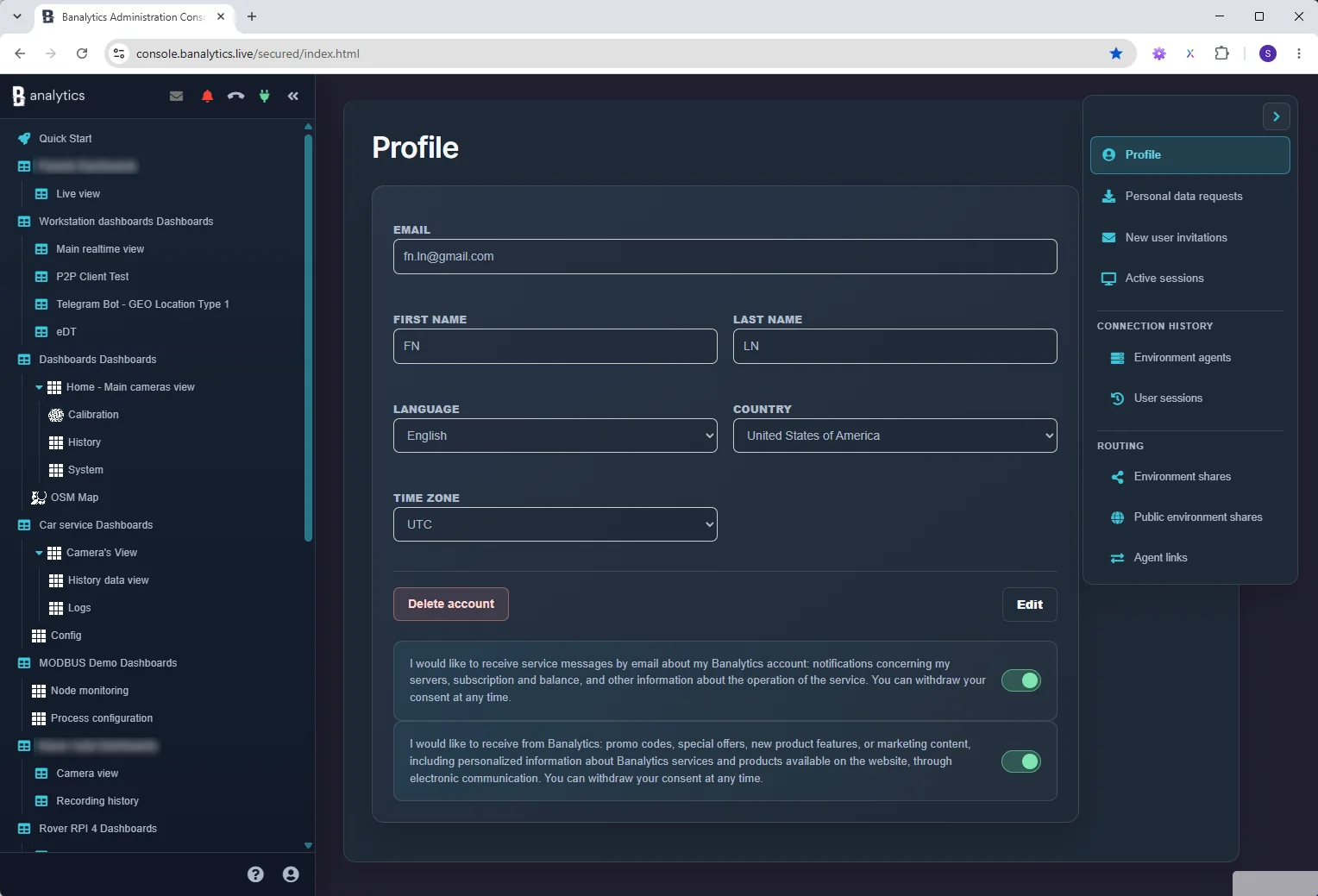
// Account details
Keep identity and display settings current
ID
Identity
The registered email is read-only. Use Edit to update first and last name.
TZ
Regional settings
Language changes Portal labels. Country and time zone provide regional context; the selected time zone is used when profile dates are displayed.
OPT
Communication choices
Service-message and marketing switches are independent and can be withdrawn at any time.
Account deletion requires confirmation. The Delete account action starts an email-confirmed deletion flow and signs the current user out. Review the account deletion guide first.
// Profile tools