Event History Recorder
Event History Recorder persists selected system events to a queryable database history with configurable retention and automatic cleanup.
Record selected events for review and troubleshooting
The component configures recording of events to the internal Banalytics VMS storage or another configured database. The view has two tabs: Realtime and Grouped. They are different visualization methods for logged events.
Without special configuration, the Realtime tab displays events generated by the Banalytics agent at the current moment. The delay depends on the network and runtime state. By default, however, events are not stored permanently: once you leave the page, transient realtime history is lost.
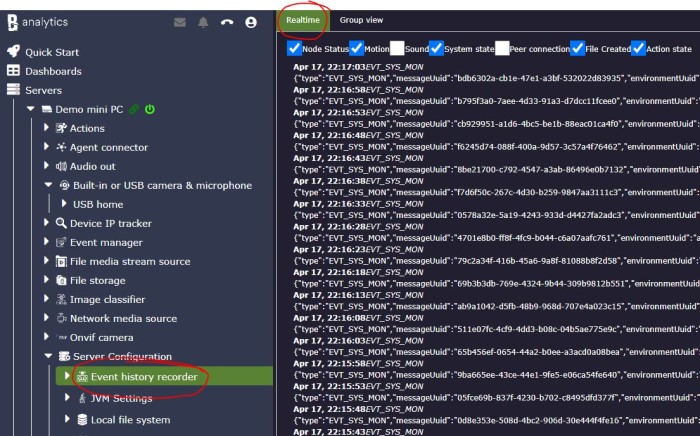
Create or select a recorder
Add an Event History Recorder and choose a Datasource, retention length, and cleanup period.
Forward events intentionally
To persist events, configure forwarding to the Event History Recorder, usually through Event Manager. This keeps stored history explicit and prevents high-volume events from being recorded accidentally.
Review status and incident timelines
Use recorded events to inspect action and task status changes, file recording activity, camera lifecycle events, and the moments when the system was stopped or started.
Configuration parameters
| Parameter | Required | Description | Default |
|---|---|---|---|
ID | Yes | A unique, automatically generated identifier for this component instance. This value is not editable. | Auto |
Restart on failure | Yes | Restart mode after an error:
| 10 sec |
Title | Yes | A custom label for this Event History Recorder instance, making it easier to distinguish multiple recorders. | None |
Datasource | Optional | SQL database used to store event history. Options are populated from configured Data Source components. | None |
History length (days) | Yes | Retention period for stored events. A shorter value keeps the database compact; a longer value is useful for audit trails and operational review. | None |
Clean up period | Yes | Interval for executing the event cleanup job that removes expired records. | Hour |
History is stored only for forwarded events
Event History Recorder stores events that are explicitly forwarded to it. This is usually configured through Event Manager by adding an action that forwards selected events to the recorder. Because recording is explicit, noisy event streams are kept out of the database unless a rule intentionally routes them there.
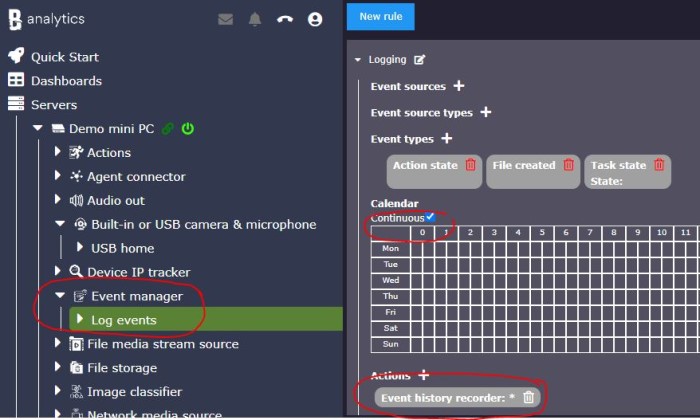
The example below logs changes in action and task statuses and file recording activity. With this configuration, a server reboot records stop and start events for the server, linked cameras, and their tasks, which helps operators see when the surveillance system was down.
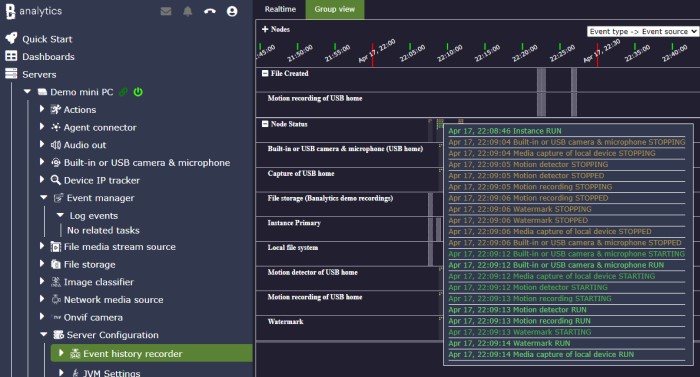
Realtime view
Shows events currently generated by the agent. It is useful for observing live behavior, but it does not mean events are stored permanently.
Database history
Stores selected events in the configured datasource so operators can query incidents, status changes, and audit trails later.
Retention and cleanup
Removes expired records according to History length (days) and Clean up period, balancing visibility against database size.
Design event history for signal, retention, and database load
Controlled event recording
Use Event History Recorder when selected events must be stored in a queryable database history instead of only appearing in logs or transient UI notifications. It stores events that are forwarded to it, typically through Event Manager. This makes the history explicit and controlled, so high-volume events are recorded only when a rule intentionally routes them to history.
Choose a stable title
Set Title to describe the history purpose, for example default audit history, security events, camera alarms, or integration troubleshooting. Keep the title stable so operators can recognize the recorder over time.
Select the database
Set Datasource to the database where event records should be stored. The local data source is suitable for small installations, short retention, and troubleshooting. Use an external database for high volume, longer retention, or faster queries.
Tune retention
Use History length (days) to control retention. A small value keeps the database compact and is usually enough for debugging or short-term alarm review. Larger values are useful for audit trails and reporting, but storage grows with event volume and payload size.
Schedule cleanup
Use Clean up period to define how often expired records are removed. More frequent cleanup keeps the table smaller but adds regular database work. Less frequent cleanup reduces cleanup overhead but lets expired records accumulate between cleanup runs.
Inspect and replay carefully
Stored records include component identity, time, event type, and serialized event payload. The history UI and API can filter by component, time, event type, and event content. Event replay is useful for testing rules but should be used carefully in production.
Recommended profiles
Short-term troubleshooting
Use the local data source, set History length (days) to 1, clean up every hour, and forward only the event types currently being investigated.
Security or audit trail
Use an external database, choose retention according to policy, keep cleanup enabled, and forward only meaningful events such as connection state, user session audit, alarms, and critical device changes.
Camera alarm review
Forward motion, sound, ONVIF, or object-detection events from selected cameras. Keep retention long enough for operators to review incidents, but avoid forwarding every frame-level or high-frequency event.
High-volume analytics
Store only aggregated or final events. Do not forward raw noisy detections unless the database and retention policy are sized for that volume.
Rule testing and replay
Record a narrow set of events, inspect their serialized shape in history, and replay only safe events. Avoid replaying events that trigger external side effects such as reboot, notification storms, or repeated actuator commands unless those actions are disabled or isolated.
Operational notes
Forward only useful events
Event history is most useful when it records meaningful state changes, alarms, audit events, and selected troubleshooting data rather than every high-frequency runtime signal.
Watch database growth
If history queries become slower, reduce retention first, then adjust cleanup frequency, and then move the history to a stronger database if needed.
Be careful with replay
Replay can fire an event back into the engine. Use it for safe testing workflows and avoid replaying events that can trigger real-world side effects.