Embed a camera's live stream on your website
Public sharing turns a camera on your Banalytics Box into a WebRTC endpoint that any web page can embed, without exposing your account or the rest of your environment. This page walks through creating a public share, embedding it, and testing the connection live.
One token, one camera, one domain
A public share is a long random token bound to a single environment. When you create it you choose exactly which camera (or other media source) it exposes and whether audio is included, and you restrict which website domain is allowed to open a connection with it. Visitors' browsers never talk to your Banalytics Box directly — the token is exchanged with the portal over a secure WebSocket, and video is then delivered peer-to-peer over WebRTC for sub-second latency.
Scoped token
Each public share token only grants the permissions you explicitly add to it — typically just the video (and optionally audio) stream of one camera.
Domain-restricted
The token only works from the browser origin you registered. Use an exact domain, localhost, or a *.yourdomain.com wildcard for subdomains.
Low latency
Once the WebSocket handshake completes, media flows over WebRTC directly between the visitor's browser and your Banalytics Box — typically under half a second of latency.
Create a public share
Open Access management
In your Banalytics Box console, click P2P communication under Server configuration, then switch to the Access management tab and click Public share.
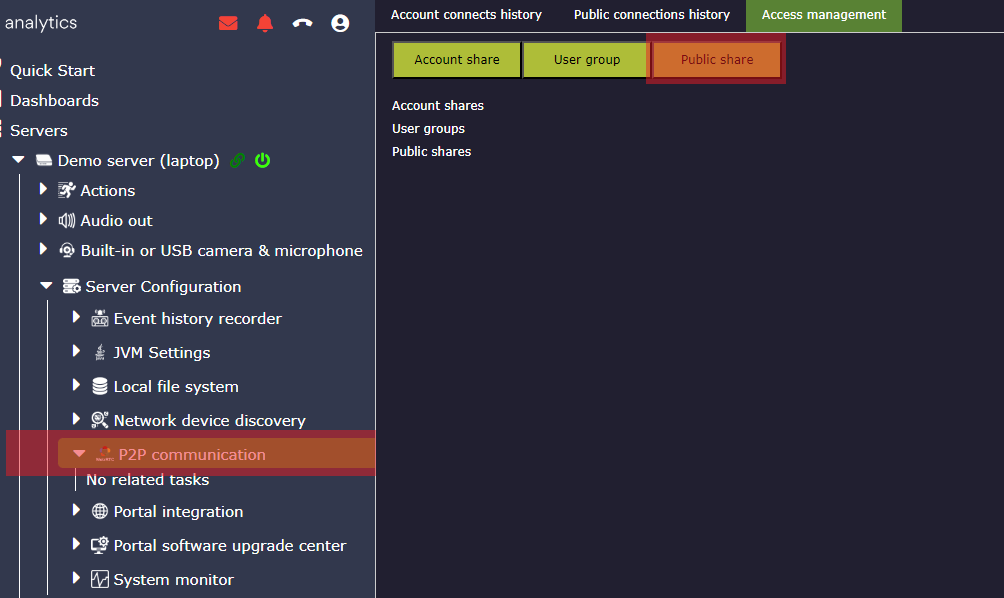
Enter the allowed domain
Type the domain that will host the embed. To test the live form on this page, enter banalytics.live — that is the domain this page is served from, so the connection guard will accept it.
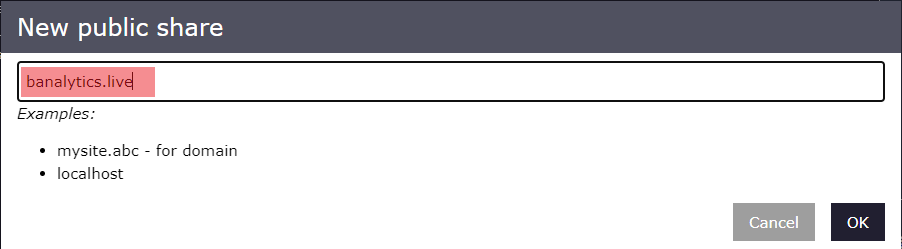
Origin header (or as a *.domain.tld wildcard if you enter one). A registered domain never matches as a prefix of another one, so banalytics.live cannot be satisfied by, say, banalytics.live.attacker.io.Add the camera
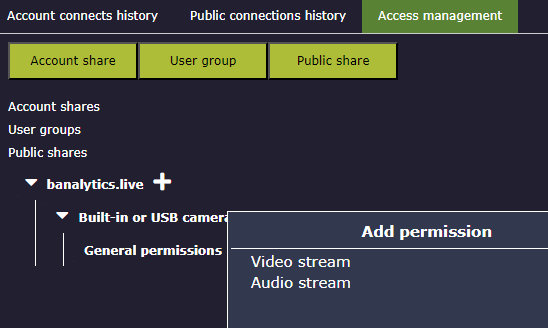
Click the icon next to the domain entry and select the camera (or other media source) this token should expose.
Grant stream permission
Click next to General permissions on the camera and add Video stream, and Audio stream if the embed should include audio.
Copy the connection details
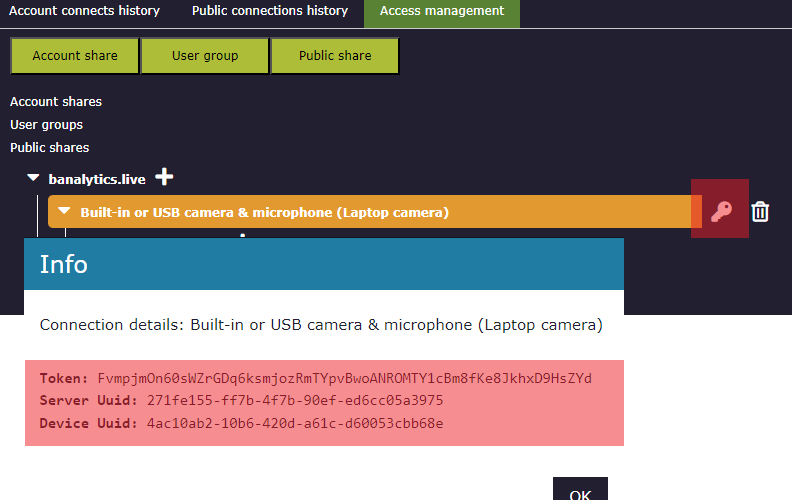
Click next to the shared camera to reveal its Token, Server Uuid, and Device Uuid. You'll need all three for the embed code and the test form below.
What protects the public link
Public sharing is designed to be safe to hand out on a public web page, but it is still a bearer token — treat it like an embed key, not a secret password.
Domain allow-list
The portal rejects the WebSocket handshake unless the connecting page's origin matches the domain (or wildcard) you registered, stopping the link from being embedded on other sites by casual copy-paste.
Connection limits
Each environment caps how many public connections it holds at once and how many it accepts per second, configurable on the Portal WebRTC Integration component, so a burst of traffic against a leaked link can't overwhelm your Banalytics Box.
Revoke anytime
Deleting the public share entry immediately invalidates its token; any embedded page using it will fail to reconnect.
Origin. Revoke and re-create the share if a token leaks.Embed code
Two scripts do all the work: public-peer-integration.js loads the portal's WebRTC client classes and opens the connection, and your page's init(mediaConfig) callback (received via the onInitFunc attribute) starts and stops it.
<!DOCTYPE html>
<html lang="en">
<head>
    <meta charset="UTF-8">
    <title>Live camera</title>
    <style>
        .media-stream-view { position: relative; width: 640px; height: 480px; background: black; }
        .media-stream-view .error { position: absolute; text-align: center; width: 100%; left: 0; top: 45%; color: red; }
        .media-stream-view .media-controls { position: absolute; right: 15px; bottom: 5px; font-size: 20px; z-index: 105; color: white; }
        .media-stream-view .media-controls > i { margin: 0 0 0 10px; cursor: pointer; }
    </style>
</head>
<body>
    <button type="button" onclick="start()">Start</button>
    <button type="button" onclick="stop()">Stop</button>
    <div id="mediaContainer"></div>

    <script>
        let mediaConfig = null;

        function initPublicShare(initializer) {
            window.initializer = initializer;
        }

        function start() {
            mediaConfig = {
                token: '... public share token ...',
                environmentUuid: '... server uuid ...',
                cameraUuid: '... device uuid ...',
                containerId: 'mediaContainer',
                mediaStreamIndex: 0
            };
            window.initializer(mediaConfig);
        }

        function stop() {
            if (mediaConfig && mediaConfig.stop) {
                mediaConfig.stop();
            }
        }
    </script>
    <script src="https://banalytics.live/js/public-peer-integration.js" onInitFunc="initPublicShare"></script>
</body>
</html>
Once init() runs, mediaConfig.stop() becomes available — call it to close the peer connection and clear the video before starting a different camera or navigating away.
Test your public connection
Paste the token, server uuid and camera (device) uuid from step 5 above and click Check. This only works if you entered banalytics.live (or a *.banalytics.live wildcard) as the allowed domain, since that's what this page's origin is.
?token=...&environment=...&camera=... in the URL to pre-fill the fields below.If the test doesn't connect
Domain mismatch
The public share's registered domain must match the page's origin exactly (or via a *.domain wildcard). Re-check the value you entered in step 2.
Token, server or camera uuid wrong
Re-copy all three values from the connection details popup (step 5) — a stray space or a mixed-up field is the most common cause.
No video permission
The shared camera needs the Video stream general permission (step 4); without it the connection opens but no media is delivered.
Browser support
Playback uses the WebCodecs API, available in current Chrome, Edge, and other Chromium-based browsers. Older browsers or Firefox without WebCodecs enabled won't decode the stream.
Connection limit reached
If the environment is already at its configured concurrent-connections limit, new attempts are rejected until an existing session disconnects.